Configuring popup blocker preferences
For the PC:
- Open Firefox
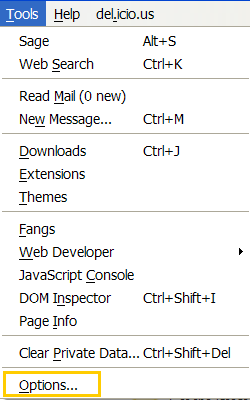
- Select Tools, Options
.
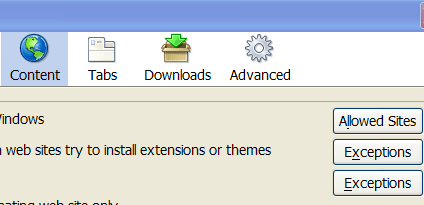
- When the Options dialog box opens, select the Content category, and click Allowed Sites
- Type the URL of the website you want to permit popup windows from, and then select Allow
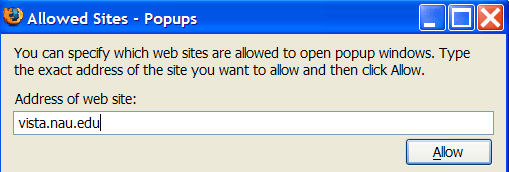
- To close the Allowed Site dialog box, choose Close
- To close the Options dialog box, select OK
- For the settings to take an effect, close and reopen Firefox
Note: Blocking popup windows may not always work and may interfere with some websites.
How to configure Internet Explorer popup blocker preferences
- Open Internet Explorer
- On the Tools menu, select Popup Blocker, and then click Popup Blocker Settings
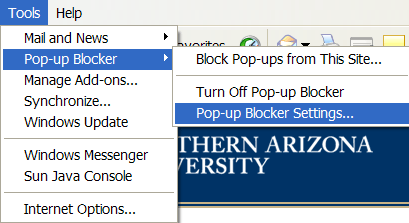
- In the Address of Website to allow box, type the address (or URL) of the website you want to permit popup windows from, and then click Add
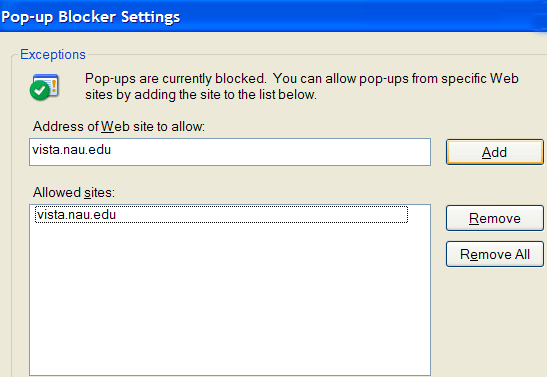
- To close the Popup Blocker Settings dialog box, choose Close
- For the settings to take an effect, close and reopen Internet Explorer